Category: User Experience (UX)

User Experience focuses on how visitors interact with your website and how easily they can find what they need.

This category explains best practices for navigation, layout, usability, and accessibility. Learn how to design experiences that feel smooth and intuitive, improve engagement, and reduce friction.

These insights help service businesses create websites that support both users and search performance.

  • Guide to Creating Phone Number Links for Business Owners

    Guide to Creating Phone Number Links for Business Owners

    Imagine you’re browsing a website on your phone and seeing a cool product. Curious for additional details, you look for the phone number to call and ask questions. But finding it is a pain! You have to squint at the tiny text, carefully copy it, then open your phone’s dialer and paste it in. Wouldn’t it be awesome if you could just create a website link for a phone number so users can tap it and their phone dials automatically? This simple feature enhances user experience and makes connecting with your business a breeze!

    That’s where clickable phone number links come in! This guide will walk you through the process of creating these links, highlighting their benefits and best practices to enhance user experience and drive conversions.

    What are Clickable Phone Numbers?

    Clickable phone numbers are website links specially formatted to initiate a phone call when clicked on a mobile device. Unlike standard phone numbers displayed as text, these links function as hyperlinks, triggering the user’s phone’s dialing app with a single tap.

    Unfortunately, many websites still display phone numbers as plain text, making it cumbersome for users to dial them manually. By implementing clickable phone number links, or learning how to create a website link for a phone number, you can significantly improve user experience and optimize your conversion rates.

    Why Use Clickable Phone Numbers for Your Business?

    Clickable phone numbers are not just a convenience—they’re a critical part of creating a user-friendly website that caters to mobile users. By following these best practices, you can ensure customers can easily connect with your business, increasing trust, engagement, and sales opportunities.

    • Mobile-First Experience: The majority of web traffic now originates from mobile devices. Clickable phone numbers cater perfectly to this mobile-first world, offering a convenient and immediate way for users to reach out.
    • Increased Contact Rates: By removing the friction associated with manually dialing a phone number, clickable links encourage more users to actually make the call. This can translate to a significant increase in contact rates and potential conversions.
    • Streamlined Communication: No more copying and pasting phone numbers! Clickable links streamline the communication process, saving users time and effort.
    • Enhanced Customer Support: Clickable phone numbers also complement customer support emails by providing an additional channel for immediate assistance. Including a clickable phone link in support emails ensures customers can quickly transition from written communication to a phone call when they need real-time help. This approach fosters trust and shows your commitment to responsive customer care.

    How Call Links Work

    Creating clickable phone number links is straightforward with HTML5. The tel-link protocol is used to format these links. When a user clicks on a clickable link, the browser responds by launching the phone app and populating the number for dialing. By learning how to create a website link for a phone number, you ensure this process is seamless. Depending on the browser and device settings, it may even prompt the user for confirmation before making the call.

    How Do HTML Telephone Links Work?

    When you click or tap a hyperlink on a webpage, it typically directs you to another page using the HTTP protocol. However, other protocols serve different purposes. For instance, the mail-to protocol allows users to send emails directly from a link without leaving the page.

    The tel-link protocol enables users to make phone calls by clicking or tapping the hyperlink on a webpage without needing to copy and paste the number into their phone app. Depending on the browser and device used, clicking a tel-link (tel:) protocol may either initiate the call immediately or prompt the user for confirmation, preventing accidental calls.

    These telephone links can be placed anywhere on your website where hyperlinks are allowed—headers, footers, main content areas, or even pop-ups.

    How to Create Clickable Phone Number Links

    Clickable phone number links are an essential feature for mobile-friendly websites, allowing users to tap the number and directly make a call. This functionality is particularly useful for businesses aiming to enhance user experience and increase conversions.

    Using Your Website’s Text Editor

    Most website builders and Content Management Systems (CMS), such as WordPress, Squarespace, or Wix, offer built-in tools to create clickable phone numbers without needing to edit raw HTML.

    • Locate the Phone Number: Identify the section of your website where you want the clickable phone number displayed, such as the contact page, header, or footer.
    • Highlight the Number: Select the phone number text within your website’s text editor.
    • Insert Hyperlink: Click on the “Insert/Edit Link” button or icon (often symbolized by a chain link). A dialog box will appear, allowing you to input the link details.
    • Add the “tel:” Prefix: In the link URL field, type “tel:” followed by the phone number without any spaces or dashes. For example tel:5551234567
    • Click “Apply” or “OK”: Save the changes. The phone number should now appear as a hyperlink that users can tap or click to call.

    Using HTML Code

    For those with access to the HTML code of their website, creating a clickable phone number manually is straightforward.

    • Access HTML Code: If you have access to your website’s HTML code, you can directly insert the following code: <a href=”tel:5551234567″>Call Us Now</a>
    Creating website link for phone number using HTML
    • Replace 5551234567 with your actual phone number. An example of a number 123-456-7890 becomes:
    Creating website link for phone number using your phone number
    • Save the Changes: Save your edited HTML file and upload it to your server, or save the changes in your CMS.

    Additional Tips for Optimizing Clickable Phone Numbers

    To ensure your clickable phone number links are not only functional but also user-friendly and accessible, consider these additional optimization tips.

    Format for Readability

    • While the tel-link (tel:) protocol uses numbers without spaces or special characters, you can format the visible text to be user-friendly.
      • Example: <a href=”tel:1234567890″>(123) 456-7890</a>
    Formatting website link for phone number for readability

    Add Accessibility Attributes

    • Enhance accessibility for users with screen readers by including the aria-label attribute:
      • Example: <a href=”tel:1234567890″ aria-label=”Call us at 123 456 7890″>(123) 456-7890</a>
    Formatting website link for phone number by adding accessibility attributes

    Test Thoroughly

    • After creating the clickable phone number link, test it thoroughly on both desktop and mobile devices to ensure it functions correctly.

    These tips will help you create effective clickable phone number links that are user-friendly, accessible, and contribute to a positive user experience on your website.

    How to Link a Telephone Number with a Country Code in HTML

    Clickable phone links are essential for mobile-friendly websites, allowing users to call directly with a tap. Adding a country code to these links ensures they work internationally. Here’s a step-by-step guide:

    • Create the Anchor Element: Use an anchor tag (<a>), which turns text into a hyperlink. The phone number will be the href value.
    • Add the tel: Protocol: Use tel: as the protocol in the href attribute to signify a telephone link.
    • Include the Country Code: Add a + followed by the country code before the phone number. This makes the number accessible globally.
    • Write the HTML Code: For example, if the number is (555) 555-5555 and the country code is “+1” (United States): <a href=”tel:+15555555555″>555-555-5555</a>
    Writing HTML Code
    • Replace the placeholder with your actual phone number and country code.

    Where to Place Your Telephone Links

    The placement of your clickable phone links should align with user behavior and expectations. Strategic placement ensures visibility without being intrusive.

    Header

    The header is an ideal spot for phone numbers if your business relies on phone inquiries, such as for consultations, reservations, or sales calls.

    • Why the Header?
      Users often look at the top of the page for immediate contact information. This placement makes it quick and convenient.
      • Example: <header> <a href=”tel:+1234567890″>Call Us: (123) 456-7890</a> </header>
    Adding phone number to the header

    Footer

    Including a phone number in the footer is another smart choice. The footer often acts as a “contact hub” where users find additional information like your email, address, or social media links.

    • Why the Footer?
      Users scrolling through your site may land here looking for ways to connect with you.
      • Example: <footer> <p>Contact us: <a href=”tel:+1234567890″>(123) 456-7890</a></p> </footer>
    Adding phone number to the footer

    Contact Page

    The contact page is one of the most logical places for a telephone link. It should be prominently displayed in the main content area alongside other contact options like email forms or addresses.

    • Why the Contact Page?
      Visitors on this page are likely looking to reach out, so placing the phone link here improves accessibility.
      • Example: <main> <h1>Contact Us</h1> <p>Call us directly at <a href=”tel:+1234567890″>(123) 456-7890</a>.</p> </main>
    Adding phone number to the contact page

    Here’s an example of a web page where the phone number is strategically placed in three key areas: the header, footer, and main content.
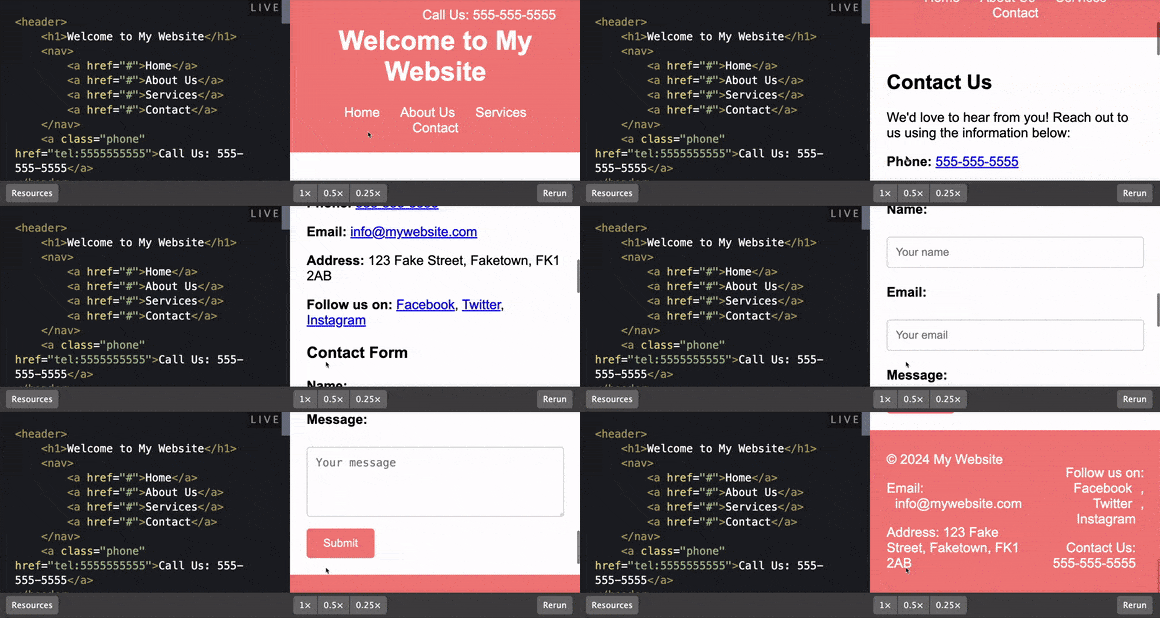
    Adding HTML Telephone link to a website

    These placements ensure the phone number is highly visible and accessible to users regardless of where they are on the page.

    By learning how to create a website link for a phone number and adding it to the header, users can find it immediately upon landing on the site. Including it in the footer ensures it’s available as they scroll down, and positioning it in the main content reinforces accessibility for visitors actively seeking contact information. This approach improves user experience and encourages direct communication.

    Best Practices for Clickable Phone Numbers

    As a business owner, adding clickable phone numbers to your website is an effective way to make it easy for customers to reach you, boosting conversions and improving user experience. Follow these best practices to ensure your clickable phone numbers are optimized for accessibility and functionality.

    Ensure Clear Visibility

    Place your clickable phone number in prominent locations where visitors are likely to look. Consider adding it to:

    • Header: Ideal for businesses relying on phone inquiries, such as service-based companies or consultative sales.
    • Footer: A natural spot for contact details like phone numbers, email addresses, and business information.
    • Contact Page: A must-have for any website, as users often visit this page specifically to find contact information.
    • Content Areas: Include your clickable phone number within relevant sections, such as service descriptions or landing pages, to encourage immediate action.

    Making your phone number easy to spot ensures that potential customers can connect with you effortlessly, whether they’re on mobile or desktop.

    Use Compelling Calls to Action (CTAs)

    Accompany your clickable phone number with strong CTAs to prompt users to take action. CTAs provide context and motivate visitors to engage. Examples include:

    • “Call Us Now to Schedule Your Appointment”
    • “Get a Free Quote by Phone Today”
    • “Speak to an Expert About Your Needs”
    • “Contact Us for Fast Assistance”

    These phrases create urgency and provide a clear reason for customers to pick up the phone.

    Test Across All Devices

    Cross-device testing is essential to ensure your clickable phone numbers work seamlessly on:

    • Smartphones: The primary platform for tap-to-call functionality.
    • Desktops: While clicking may open a VoIP app, ensure it doesn’t create errors.
    • Tablets: Test for responsiveness and ease of access on different screen sizes.

    Use multiple browsers and operating systems to confirm that the links work as expected for all users.

    Common Mistakes to Avoid

    Even small errors can prevent your clickable phone numbers from functioning correctly. Avoid these common pitfalls:

    Forgetting the “tel:” Prefix

    The tel: prefix is what tells the browser to initiate a phone call. Without it, the link won’t function. Always format your links like this:

    Common mistake to avoid

    Incorrect Phone Number Formatting

    Avoid using spaces, dashes, or special characters in the href value of your phone link. While the visible text can include formatting for readability, the actual link should follow this pattern:

    • Correct: tel:+1234567890
    • Incorrect: tel:+123-456-7890

    This ensures the phone app can interpret the number correctly.

    Failing to Test Links

    An untested phone link can lead to lost opportunities if it doesn’t work as intended. After creating your links, always test them by:

    • Clicking on them from a mobile device to verify they open the phone app.
    • Testing on various devices and browsers to ensure compatibility.
    • Have a colleague or team member double-check to catch any errors you might have missed.

    Overlooking Mobile Optimization

    A significant mistake is neglecting to optimize clickable phone links for mobile devices. Since most users access websites via smartphones, your phone links must open the phone app seamlessly. A poorly optimized link can frustrate users and result in lost leads. Always test your links on multiple mobile devices and browsers to ensure a smooth experience.

    Conclusion

    Adding clickable phone numbers to your website is a simple yet powerful way to enhance user experience and make it easier for customers to connect with your business. By learning how to create a website link for a phone number and following best practices like clear placement, compelling CTAs, and thorough testing, you ensure that your phone links are accessible and functional across all devices. Avoid common mistakes such as incorrect formatting or untested links, and take the time to optimize this critical feature.

    Need help setting up or optimizing your website’s clickable phone links? Wolfpack Advising is here to support you. Schedule an online consultation today and receive a custom proposal tailored to your business needs.

  • Structuring Your Blog Post Headings for SEO Wins

    Structuring Your Blog Post Headings for SEO Wins

    Headings are like blog post GPS—they help readers and search engines easily navigate your content. If the headings are well-structured and optimized for SEO, each blog post can guide more traffic to your site and keep readers engaged.

    Even if it’s your first shot at writing a blog article for your site, mastering the art of a heading hierarchy is a smart move for SEO and reader experience. This guide will lay out exactly how to organize your title tags so each post is set up for success.

    What Are Headings in a Blog Post?

    Blog post headings, often called title tags in SEO contexts, are essential for organizing your content. While both terms are related, they serve slightly different purposes.

    • Blog post headings are the visual titles and subheadings readers see as they scroll through your article.
    • Title tags are the HTML elements used to define the main title of your page, which appears in search engine results and browser tabs.

    Headings follow a general order. The H1 is your main blog post title, while H2s, H3s, and beyond divide the content into smaller, readable sections.

    Together, they create a roadmap that helps readers find what they need quickly and signals to search engines how your content is structured. When your headings are specific and well-organized, they make your blog easier for readers to navigate and more valuable.

    Why blog post headings and title tags matter for your seo

    How Do Blog Post Headings Impact SEO?

    Headings play a critical role in improving your blog post’s visibility and usability. They help by:

    • Highlighting keywords: Placing target keywords in headings helps search engines understand your content’s relevance to specific queries.
    • Organizing content for crawlers: Headings create a clear hierarchy that search engines use to process your page.
    • Enhancing experience: Structured headings make your blog scannable, which keeps readers on the page longer and reduces bounce rates.

    For example, if your blog post has clear H2s that match common search queries, search engines are more likely to connect your content with those queries. Then, when readers find the information they need quickly because of your optimized headings, your organic SEO can be boosted by an average of 30%.

    Breaking Down the Heading Hierarchy

    A clear and consistent heading structure is essential for making your blog readable and SEO-friendly. These practices will help your headings guide readers and search engines effectively.

    Start with a single H1 as the main title of your blog post and should include your primary keyword. It’s the first thing readers and search engines see, setting the stage for your content.

    Then, use H2s for major sections. These will introduce key points or topics within your post. Think of H2s as chapter titles that organize your main ideas—like this section’s H2, “Breaking Down the Heading Hierarchy”.

    Add H3s and lower-level headings for details. These subheadings break down the H2 sections into smaller, specific parts. When sections get too long-winded, you start losing readers.

    For instance, under an H2 like “How to Maintain Shingles,” you could use H3s to explain specific strategies like sealants or cleaning.

    Try to maintain a logical flow and keep headings in order. As an example, move from H1 to H2 to H3 without skipping levels. Skipping (like jumping from H1 to H4) can confuse the reader and disrupt the structure.

    Finally, balance structure and content length to avoid sections that are too short or overly long under a single heading. If a section becomes too dense, consider breaking it into smaller subsections with more refined H3s for readability.

    Blog post headings in WordPress for SEO

    Tips for Writing Effective Headings

    Crafting strong headings is about finding the perfect balance between clarity, engagement, and SEO optimization. Use these tips to guide your content to the top:

    1) Be specific and clear

    Let readers know exactly what to expect in the section. Vague headings like “More Details” don’t add value.

    2) Naturally include keywords

    Place target keywords in headings where they make sense, without overstuffing or making them sound forced.

    3) Keep headings concise

    Short, punchy headings are easier to skim and more likely to grab attention. Aim for headings that are easy to read at a glance.

    4) Write for humans first

    Make your headings engaging and relatable. Use language that appeals to your audience while staying aligned with their search intent.

    5) Align headings with the content flow

    Ensure your headings follow a logical progression, helping readers easily navigate from one point to the next.

    6) Use action-oriented language

    When appropriate, make your headings actionable to spark curiosity or guide readers toward a solution, like “5 Simple Steps to Better SEO.”

    7) Match user intent

    Consider what readers want to learn and frame your headings to answer their questions. Strong headings create a positive experience for readers while signaling to search engines that your content is relevant and well-organized.

    When you combine clarity, value, and a touch of creativity, your headings will help your blog post stand out.

    Common Mistakes to Avoid

    Even small missteps in your headings can impact your blog’s readability and SEO performance. Here’s what you don’t want to do:

    Too many headings

    Overloading your post with unnecessary subheadings can make it feel cluttered and harder to read. Stick to headings that add value and provide structure.

    Skip important keywords

    Neglecting to include relevant keywords in your headings is a missed opportunity to improve your SEO and align with user search intent.

    Improvement suggestion for headings shown by Yoast SEO plugin in WordPress

    Heading improvement suggestion shown by Yoast SEO plugin in WordPress

    Inconsistent or overcomplicated

    Mixing font styles, sizes, or capitalization across headings can distract readers and make your blog look unpolished. Maintain a consistent style throughout.

    Adding too many levels of headings (like H4s and H5s) can confuse readers. Stick to a clear and simple structure unless your content truly requires deeper subdivisions.

    How You Can Use AI for Headings and Structure

    AI tools can make writing and organizing blog post headings easier and faster. Always closely review and tweak its suggestions to match your tone and audience.

    Think of AI as a handy tool to speed up your process, not a replacement for thoughtful writing! When it comes to blog headings and structure, here are just a few ways you can use AI to level up your content:

    • Brainstorming: Struggling to come up with engaging headings? AI tools can suggest options that include relevant keywords and grab readers’ attention.
    • Keeping content organized: Use AI to check that your headings follow a logical order, like H1 → H2 → H3, so your post flows smoothly and makes sense.
    • Rewriting: AI tools can help you simplify long or confusing headings, making them easier for readers to skim and understand.
    • Fine-tuning: Some AI tools can analyze your headings to ensure keywords are placed naturally, without overstuffing, and that they align with search engine requirements.
    • Saving time and polishing drafts: AI can quickly spot issues with your heading structure or suggest edits to make them more readable and engaging.

    A Note on Prompting AI

    When using AI for headings, how you use the tool matters for the value you get from it. In other words, be specific in your requests to get the best results.

    For example, instead of asking for “headings for an SEO blog,” try something like, “Generate five concise H2 headings for a blog about structuring headings for SEO. Include natural keywords and make them engaging for readers.”

    If the AI’s output isn’t quite right, refine your prompts by adding details, such as your blog’s target audience, tone, or the primary message you want to convey. Remember, the more context you give, the better the AI can assist.

    Conclusion

    Structuring your blog post headings for SEO is one of the simplest ways to create content that works for both readers and search engines.

    Clear, logical headings improve navigation, boost engagement, and help search engines connect your content with the right audience. If you’re looking for more ways to optimize your blog posts and get results, Wolfpack Advising can help—contact us today to get started!

  • Optimizing Accounting Websites for Enhanced Traffic

    Optimizing Accounting Websites for Enhanced Traffic

    [vc_row type=”in_container” full_screen_row_position=”middle” column_margin=”default” column_direction=”default” column_direction_tablet=”default” column_direction_phone=”default” scene_position=”center” text_color=”dark” text_align=”left” row_border_radius=”none” row_border_radius_applies=”bg” overflow=”visible” overlay_strength=”0.3″ gradient_direction=”left_to_right” shape_divider_position=”bottom” bg_image_animation=”none”][vc_column column_padding=”no-extra-padding” column_padding_tablet=”inherit” column_padding_phone=”inherit” column_padding_position=”all” column_element_direction_desktop=”default” column_element_spacing=”default” desktop_text_alignment=”default” tablet_text_alignment=”default” phone_text_alignment=”default” background_color_opacity=”1″ background_hover_color_opacity=”1″ column_backdrop_filter=”none” column_shadow=”none” column_border_radius=”none” column_link_target=”_self” column_position=”default” gradient_direction=”left_to_right” overlay_strength=”0.3″ width=”1/1″ tablet_width_inherit=”default” animation_type=”default” bg_image_animation=”none” border_type=”simple” column_border_width=”none” column_border_style=”solid”][vc_column_text text_direction=”default”]

    In the digital age, accounting firms must optimize their websites to attract and retain clients. An effective website serves as the foundation of your digital presence, directly influencing client acquisition and retention.

    This guide delves into optimizing accounting websites for better traffic, employing an informative and instructive tone to break down complex concepts into actionable steps.

    Understanding the Importance of Website Optimization

    Understanding the importance of website optimization, particularly for accounting firms, involves recognizing how it strategically benefits the firm in the digital landscape.

    SEO (Search Engine Optimization) plays a pivotal role in ensuring that an accounting firm’s website not only attracts more visitors but also engages and retains them effectively through a superior user experience. Let’s explore how SEO benefits accounting firms and impacts user experience and retention.

    SEO Benefits for Accounting Firms

    Increased Visibility in Search Engine Results: By optimizing their website with relevant keywords, accounting firms can improve their rankings in search engine results for queries related to their services. This is crucial because the higher the ranking, the more likely potential clients will visit the website.

    For accounting firms, appearing at the top for searches such as “best accounting firm near me” or “top 20 accounting firm in the US” can significantly increase visibility among prospective clients.

    Top accounting websites in the US

    Targeted Traffic: SEO allows accounting firms to target specific demographics or market segments. Through the use of detailed keyword research and local SEO strategies, firms can attract visitors who are actively seeking the accounting services they offer. This targeted approach leads to higher quality leads, as the traffic is more likely to convert into paying clients.

    Enhanced Credibility and Trust: Websites that rank well in search engine results are often perceived as more credible and trustworthy by users. For accounting firms, where trust is a critical factor in client decision-making, appearing on the first page of Google can significantly bolster their reputation and perceived reliability.

    User Experience and Its Impact on Retention

    A well-optimized website provides a seamless user experience, crucial for keeping visitors engaged and encouraging them to explore your services. This includes fast loading times, intuitive navigation, and accessible content.

    Fast Loading Times

    To optimize your website’s loading speed, particularly for accounting firms where efficiency is key, leveraging free online website speed checker tools is highly advantageous. These tools scrutinize your site’s performance metrics and offer concrete suggestions for enhancements. This process not only boosts loading speeds but also elevates the overall user experience. Renowned tools like Pingdom Tools and GTmetrix stand out for their thorough analysis and practical optimization recommendations, making them invaluable resources for website owners aiming to improve their site’s responsiveness and user engagement.

    Intuitive Navigation

    Easy and intuitive navigation helps visitors find the information they’re looking for without frustration. For an accounting firm, this could mean having a clear menu structure that directs visitors to service pages, contact information, book a call, and resources. Intuitive navigation contributes to a positive user experience, encouraging visitors to delve deeper into the site.

    A sample accounting website

    Accessible Content

    Ensuring that content is accessible to all users, including those with disabilities, is not only a matter of compliance but also enhances user experience. For accounting firms, this could involve using clear fonts, alt text for images, and transcripts for video content.

    SEO and Content Strategy

    A well-crafted content strategy, finely tuned for SEO, plays a pivotal role in engaging visitors by offering them invaluable insights. For accounting firms, this strategy might encompass a variety of blog posts, ranging from tax tips and financial planning guidance to the latest updates on regulatory changes.

    Incorporating blogging into your SEO efforts not only enhances your site’s search engine visibility but also establishes your firm as an authoritative voice in the accounting sector. This dual benefit not only boosts SEO performance but also significantly improves visitor engagement and retention rates, making it an essential component of a successful online presence

    Actionable Steps to Optimize Your Accounting Website

    Enhancing Site Speed: Site speed is a key factor in user satisfaction and SEO rankings. Tools like Google’s PageSpeed Insights can help identify areas for improvement, such as image optimization and server response times

    Implementing Responsive Design: With the growing prevalence of mobile browsing, your site must perform well across all devices. Furthermore, responsive design ensures your website automatically adjusts to the screen size and orientation of the viewer’s device.

    Streamlining Navigation: Simplify your site’s navigation to help visitors find what they need quickly. A clear, hierarchical structure with a well-organized menu can significantly enhance user experience.

    Crafting Engaging and Relevant Content: Content is king in the digital world. Provide valuable information, such as tax tips, accounting advice, and industry news, to establish your firm as a thought leader.

    Improving Technical SEO: Technical SEO elements, like meta tags, alt text for images, and structured data, help search engines understand and index your site more effectively. Regular audits can uncover and rectify issues that might be hindering your site’s performance.

    Common Mistakes to Avoid

    When optimizing a website, whether for an accounting firm or any other business, it’s crucial to steer clear of common pitfalls that can significantly hamper its performance and visibility online. Recognizing and addressing these mistakes can markedly improve a site’s effectiveness in attracting and retaining clients. Let’s explore these common mistakes in detail, with a particular focus on neglecting SEO best practices, and understand how to avoid them.

    Overlooking Mobile Optimization

    In today’s digital era, the majority of internet users access the web via mobile devices. A site not optimized for mobile is likely to offer a poor user experience, leading to high bounce rates and lost opportunities. Mobile optimization involves designing your site to be responsive, ensuring it adjusts seamlessly to different screen sizes and resolutions. So, this includes readable text without zooming, adequate space for tap targets, and fast loading times on mobile networks. Ignoring mobile optimization can result in a significant loss of potential clients who prefer to browse on their smartphones or tablets.

    Ignoring Site Speed and Performance Issues

    Site speed is a critical factor in user experience and SEO. Websites that load slowly can frustrate users, prompting them to leave before even interacting with your content or learning about your services. Google and other search engines also consider site speed as a ranking factor, meaning slow-loading sites are likely to be penalized in search results. Regularly testing and optimizing your site’s loading times—by compressing images, leveraging browser caching, and minimizing CSS and JavaScript—can significantly enhance performance and user satisfaction.

    Underestimating the Importance of High-Quality Content

    Content is the backbone of your website. High-quality, relevant content not only engages and retains visitors but also establishes your firm as an authority in your field. This involves creating informative, well-researched articles, blog posts, and service descriptions that provide real value to your audience. Content should be crafted to address the needs and questions of your potential clients, incorporating keywords naturally to improve SEO. Consequently, neglecting the quality of your content can result in low engagement and difficulty in achieving a high ranking in search results.

    Neglecting Basic SEO Practices

    Basic SEO practices are fundamental to ensuring your website is discoverable by your target audience. This includes optimizing title tags, meta descriptions, and headers to include relevant keywords, improving site structure for easy navigation, and ensuring all images have descriptive alt text. Ignoring these practices can leave your site invisible to those searching for the services you offer.

    Neglecting SEO Best Practices, Including Keyword Optimization and Local SEO Efforts

    A comprehensive SEO strategy goes beyond just basic optimization. It involves a thorough understanding and application of keyword optimization and local SEO efforts.

    Keyword Optimization

    A sample of keyword research

    This entails researching and utilizing keywords that potential clients are likely to use when searching for services you offer. It’s not just about incorporating high-volume keywords; it’s also about understanding user intent and incorporating long-tail keywords that match specific queries.

    Thus, failure to properly optimize for the right keywords can result in attracting the wrong audience or not appearing in searches at all.

    Local SEO Efforts

    For accounting firms and local businesses, local SEO is crucial. This means optimizing your website for local search queries, claiming your Google My Business listing, and ensuring your NAP (Name, Address, Phone Number) information is consistent across the web.

    Local SEO efforts help your firm appear in local search results and Google Maps, making it easier for local clients to find and contact you. As a result, overlooking local SEO can mean missing out on a significant portion of potential business from your local area.

    By avoiding these common mistakes and employing a thoughtful, comprehensive approach to website optimization and SEO, businesses can significantly improve their online visibility, user engagement, and ultimately, their conversion rates. Educating yourself and staying updated on best practices is key to maintaining a competitive edge in the digital landscape.

    Invest in Professional Accounting SEO Services

    Investing in professional accounting SEO services is essential for maximizing your website’s potential. These services offer specialized expertise in areas critical for online success, such as keyword research, local SEO, and content strategy, all tailored to the unique needs of accounting firms. They ensure your site remains competitive by adapting to ongoing search engine algorithm updates, platform changes, and industry trends. Regular technical SEO audits and continuous site health optimization help identify and resolve issues promptly, maintaining optimal website performance and visibility.

    Adapting to Changes

    Search engines like Google frequently update their algorithms, which can significantly impact your website’s visibility if not promptly addressed. Professional SEO services keep your site competitive by staying abreast of these changes, along with platform updates and industry trends. Therefore, this proactive approach ensures that your website adheres to the latest best practices and avoids penalties that could harm your rankings.

    Regular Technical SEO Audits

    Technical SEO audits are crucial for identifying and rectifying issues that could hinder your website’s performance. These audits cover various aspects, such as site speed, mobile responsiveness, internal linking structure, and more. Professional SEO services conduct these audits regularly to ensure that your website remains in optimal health, offering an excellent user experience and maintaining high visibility in search results.

    Continuous Site Health Optimization

    Ongoing optimization efforts are necessary to maintain and improve your website’s health and performance over time. This includes monitoring site speed, ensuring mobile-friendliness, improving user experience, and updating content to keep it relevant and engaging. As a result, by continuously optimizing your site, professional SEO services help you stay ahead of competitors and adapt to the evolving digital landscape.

    Investing in professional SEO services is crucial for accounting firms aiming to boost their online presence and attract more clients. Tailored specifically to the accounting industry, these services enhance website visibility, improve user experience, and keep your site up-to-date with the latest search engine algorithms and trends. For firms seeking a competitive edge in the digital landscape, partnering with WolfPack Advising represents a strategic investment in their future success.

    Conclusion

    Optimizing your accounting website for enhanced traffic and engagement requires a strategic approach, combining technical improvements with high-quality content and user experience enhancements. WolfPack Advising specializes in building and optimizing websites for accountants, offering tailored solutions that cater to the unique needs of the accounting industry. With expertise in website design, SEO, and content strategy, WolfPack Advising can help your firm attract more visitors, convert leads into clients, and establish a strong online presence.

    Boosting your website traffic takes effort, but it significantly enhances conversions, visibility, and satisfaction. In the digital era, a robust online presence is crucial. For expert advice on boosting your site’s performance or optimization strategies, book an online consultation with WolfPack Advising. We’re here to guide you through digital marketing’s complexities and maximize your website’s potential.


    [/vc_column_text][/vc_column][/vc_row]

  • What Is ADA Website Compliance?

    What Is ADA Website Compliance?

    What Is The Americans with Disabilities Act (ADA)?

    The Americans with Disabilities Act (ADA) is a federal law that prohibits discrimination against people with disabilities. This helps ensure people with disabilities are offered the same opportunities as people without disabilities.

    According to the ADA, a person with a disability is someone who meets any of the following criteria:

    • has a physical or mental impairment that substantially limits one or more major life activities
    • has a history or record of such an impairment (such as cancer that is in remission)
    • is perceived by others as having such an impairment (such as a person with scars from a severe burn)

    This could be someone who is/has:

    • Blind
    • Motor Impaired
    • Cognitive Disorder
    • Epileptic
    • Vision Impaired
    • Hearing Impaired

    What Does The ADA Cover?

    The ADA helps ensure people with disabilities have the same opportunities and access to employment, businesses open to the public, public transit, telecommunications, and participation in government programs.

    Ultimately, the ADA covers a wide arrange of categories. For businesses, it’s important to ensure you are complying with the ADA, and part of that involves your website. Let’s find out why.

    Is ADA Compliance Mandatory For Websites?

    So, if you have a business that serves the general public, does your website have to be ADA-compliant? Yes, your website must be ADA-Compliant. You can see ADA’s Guidance on Web Accessibility here.

    This is important because people with disabilities must be able to access the same goods and services just as others can. When the law was first enacted, it was not planned that websites would have to be accessible since it was implemented in 1990.

    However, over time it became clear websites were included in the ADA guidelines since domains are publicly accessible and businesses offer goods and services online.

    Here are just a few examples of how a website could be inaccessible to someone with a disability:

    • Low Color Contrast – Users who are color blind may not be able to read or interact with a website with low color contrast.
    • Lack of Text Alternatives – Users who are blind use screen readers to read alternative text (text that describes an image) to the user.
    • Lack of Keyboard Navigation – Users who cannot use a mouse or trackpad may have to navigate a site using only a keyboard.
    • Inaccessible Forms – Forms should have proper labels, captions, and signal errors for users who use screen readers.

    There are many other factors to being accessible than just the list above.

    Galvin and money

    The Rise of Lawsuits

    Recently, lawsuits against public businesses with inaccessible sites have increased. In 2018 alone, lawsuits rose 180% from the previous year, according to Usablenet.

    So why are lawsuits on the rise? Well, more people and services are online than ever. As businesses shift to servicing customers strictly online, or customers have to resort to using online means since they cannot travel, people with disabilities find issues accessing some websites.

    These lawsuits are not just affecting enterprises either. It’s estimated that 85% of the lawsuits in 2018 targeted small to medium-sized businesses.

    With the rise of lawsuits, it’s becoming clear business owners have to protect themselves.

    How To Check If Your Website Is ADA Compliant

    So, the biggest question you might have is, “is my website compliant with ADA guidelines?” The interesting part is that the ADA does not list the strict guidelines for web accessibility. Instead, they refer to web accessibility guidelines to the Web Content Accessibility Guidelines (WCAG) and the Section 508 Standards.

    The WCAG is the most commonly followed and has clearly documented guidelines on making your website accessible if you are familiar with web design practices. The WCAG breaks its guidelines up into three levels/standards. Those are:

    • Level A – the minimum web accessibility standards you should meet.
    • Level AA – the middle accessibility standard which is attainable for almost all websites.
    • Level AAA – the highest accessibility standard and unattainable for some websites.

    Therefore, at a minimum, your website should meet Level A Guidelines. Check out their quick reference guide to see if your website meets those criteria. The guide may be difficult to understand if you are unfamiliar with web design practices.

    To check if your website meets ADA website compliance, running a page test through software may be better. At WolfPack Advising, we can test your site for you, or you can find other solutions by simply doing a Google Search. However, be sure you understand the standards/level the test is reporting to you.

    If you find your website is not compliant with the WCAG or Section 508, you’re not alone. A good percentage of websites today are inaccessible to people with disabilities. However, that does not save a business from being targeted with a lawsuit.

    How To Make Your Website ADA Compliant

    At the end of the day, every business that serves the general public should make its website ADA-compliant. You can hire a web designer or someone familiar with the WCAG or Section 508 Guidelines to make your website compliant.

    However, ADA compliance is an ongoing issue. As your website is updated or changed, you will need to check if your website still meets accessibility standards.

    At WolfPack Advising, we can help with our ADA Website Compliance Services. Our software will automatically scan your website daily using AI and machine learning to check for changes in your website. Then, our widget will automatically update your website code to make your website accessible up to WCAG Level AA standards! Our solution also comes with a litigation support package and accessibility statement for your website.

    Without an automatic solution, your ADA website compliance issues can mount and be difficult to manage on your own. We would definitely recommend opting for an automated solution.

    ADA compliance is not the only service we can provide. Schedule a consultation with us today to see if your website is accessible.